
Configurar tarjeta E1 Sangoma
Asegurarnos que sea tarjeta compatible root@issabel ~]# lspci |grep -i net 11:04.0 Network controller: Sangoma Technologies Corp. A200/Remora FXO/FXS Analog AFT card Detener Asterisk dentro del cli> core stop now Correr el comando wancfg_dahdi, debemos completar los siguiente. would you like to generate /etc/asterisk/chan_dahdi.conf 1. YES 2. NO [1-2]:1 Select media type for AFT-A101 on port 1 [slot:4 bus:4 span:1] 1. T1 2. E1 3. Unused 4. Exit [1-4]:2 Configuring port 1 on 101 as E1, line coding:HDB3, framing:CRC4 1. YES - Keep these settings 2. NO - Configure line coding and framing [1-2, ENTER='YES']:1 Select clock for AFT-A101 on port 1 [slot:4 bus:4 span:1] 1. NORMAL 2. MASTER [1-2]:1 Select signaling type for AFT-A101 on port 1 [slot:4 bus:4 span:1] 1. Zaptel/Dahdi - PRI CPE 2. Zaptel/Dahdi - PRI NET 3. Zaptel/Dahdi - E & M 4. Zaptel/Dahdi - E & M Wink 5. Zaptel/Dahdi - FXS - Loop Start 6. Zaptel/Dahdi - FXS - Ground Start 7. Zaptel/Dahdi - FXS - Kewl Start 8. Zaptel/Dahdi - FX0 - Loop Start 9. Zaptel/Dahdi - FX0 - Ground Start 10. Zaptel/Dahdi - FX0 - Kewl Start 11. Sangoma SMG/sangoma_prid- PRI CPE 12. Sangoma SMG/sangoma_prid- PRI NET [1-12]:1 Select switchtype for AFT-A101 on port 1 1. National ISDN 2 2. Nortel DMS100 3. AT&T 4ESS 4. Lucent 5ESS 5. EuroISDN 6. Old National ISDN 1 7. Q.SIG [1-7]:5 Configuring port 1 on AFT-A101 as a full E1 1. YES - Use all channels 2. NO - Configure for fractional [1-2, ENTER='YES']:1 Select dialplan context for AFT-A101 on port 1 1. from-pstn 2. from-internal 3. Custom [1-3]:1 Port 1 on AFT-A101 configuration complete... Press any key to continue: T1/E1 card configuration complete. Press any key to continue: Configuration Complete! Please select following: 1. YES - Continue 2. NO - Exit [1-2]:1 Dahdi and Wanpipe configuration complete: choose action 1. Save cfg: Restart Asterisk & Wanpipe now 2. Save cfg: Restart Asterisk & Wanpipe when convenient 3. Save cfg: Stop Asterisk & Wanpipe now 4. Save cfg: Stop Asterisk & Wanpipe when convenient 5. Save cfg: Save cfg only (Not Recommanded!!!) 6. Do not save cfg: Exit [1-6]:1 Would you like wanrouter to start on system boot? 1. YES 2. NO [1-2]:1 Would you like to execute 'dahdi_cfg' each time wanrouter starts? 1. YES 2. NO [1-2]:1 Editar el siguiente archivo /etc/dahdi/system.conf loadzone=mx defaultzone=mx #Sangoma A101 port 1 [slot:4 bus:17 span:1]span=1,1,0,cas,hdb3 cas=1-15,17-31:1101 echocanceller=oslec,1-15,17-31 Agregar la señalización para R2 modificada (TELMEX) editar /etc/asterisk/dahdi-channels.conf ; Span 1: WPE1/0 "wanpipe1 card 0" (MASTER) CCS/HDB3 group=0 context=from-pstn signalling=mfcr2 ;caller = no mfcr2_logdir=span1 mfcr2_variant=mx mfcr2_get_ani_first=no mfcr2_max_ani=14 mfcr2_max_dnis=4 mfcr2_category=national_subscriber mfcr2_call_files=yes mfcr2_logging=all mfcr2_mfback_timeout=-1 mfcr2_metering_pulse_timeout=-1 channel => 1-15,17-31 | languge=es Revisar el estado de los canales [root@issabel ~]# rasterisk -x "mfcr2 show channels" [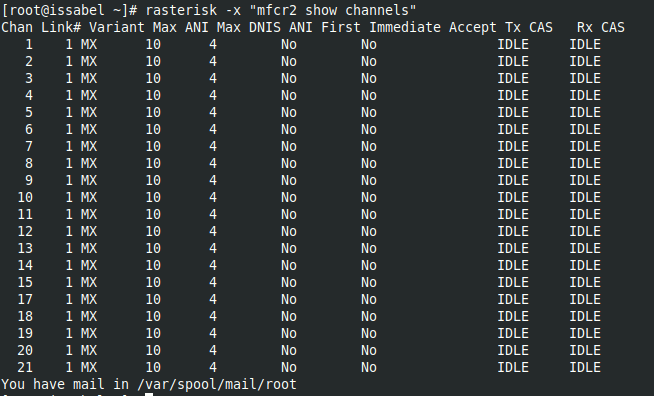](https://wiki.enlaza.mx/uploads/images/gallery/2025-09/brEJEU4ADHQq25rI-screenshot-from-2025-09-10-12-09-15.png)